by
by
In this brief control and signal processing tutorial, we explain
- The basics of the Finite Impulse Response (FIR) filter
- How to implement the FIR filter in the C++ programming language
The YouTube tutorial is given below.
Basics of the Finite Impulse Response (FIR) filter
The Finite Impulse Response (FIR) filter has the following form:
(1) 
where
 ,
,  are the inputs to the FIR filter at the discrete time instant
  .
. is the output of the FIR filter at the discrete-time instant .
 are the FIR filter coefficients.
 is the order of the FIR filter.
FIR filters have a large number of applications in control engineering and signal processing. The most simple and maybe the most widely used example is the moving average filter. For  , the moving average filter is
(2) 
where coefficients are
(3) 
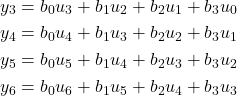
To verify the implementation, it is a good idea to expand the filter equation (1) for several values of . We assume and we start from 
(4) 
Finite Impulse Response Implementation in C++
As a test case, we implement a moving average FIR filter of the order  . First, we create a Python file that generates the input data sequence for testing the filter. The first part of the Python file is given below.
'''
Python file that
1) Generates a noisy input data for a FIR filter implemented in C++
2) Saves the noisy input data in a txt file
3) Loads the filtered data from a txt file
4) Plots both the input and output data

Author: Aleksandar Haber, PhD
SEE THE LICENSE FILE
'''

# Importing libraries that will be used
import numpy as np
import matplotlib.pyplot as plt

# number of data samples
S=1000

# name of the file to save the input raw data
# this file is an input to the C++ code implementing the FIR filter
input_filename = 'input_data.txt'
# name of the file containing the filtered data
# this file is the output of the FIR filter and it is produced by the C++ code
filtered_filename='output_data.txt'

# create an input array
# input array
input_array=np.zeros(shape=(S,1));

# generate a noisy input data
dt=0.01
for i in range(len(input_array)):
    input_array[i,0]=np.sin(i*dt)+0.2*np.random.randn()


# plot the input array
plt.figure(figsize=(10,6))
plt.plot(input_array, color='blue',linewidth=2, label="Input")
plt.legend()
plt.grid(visible=True)
plt.savefig('input.png',dpi=600)
plt.show()


# Save the array to a text file
np.savetxt(input_filename, input_array)
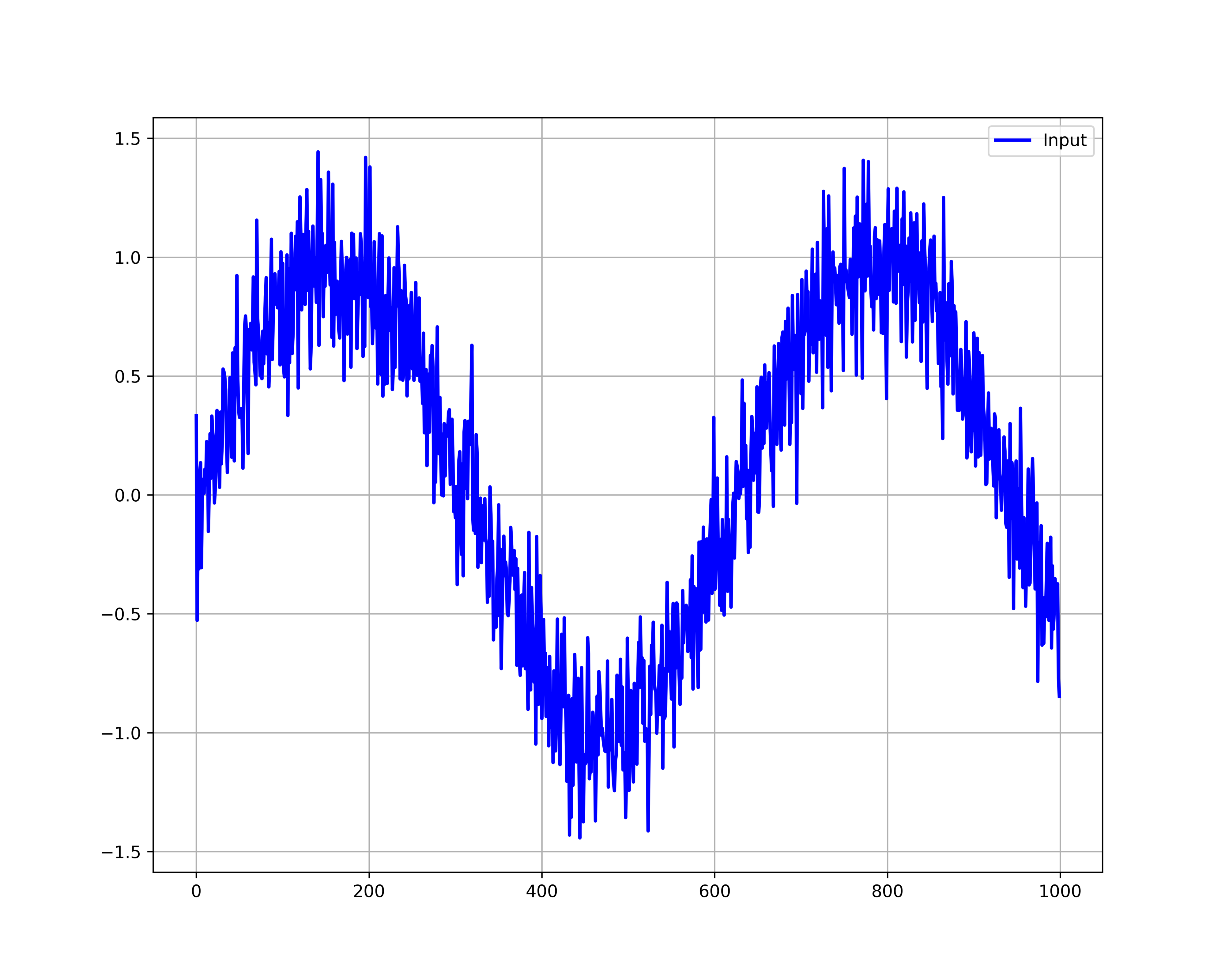
The data is generated and saved in the file whose name is: “input_data.txt”. The generated sequence is shown below.
Next, we write C++ functions. The functions are implemented in the file called “functions.cpp” given below
#include<vector>
#include<iostream>
#include<fstream>
#include<string>

using namespace std;

int load_data(vector<double>& loaded_data,const string& file_name)
{
    ifstream inputStream;

    double value;

    // open the file

    inputStream.open(file_name);

    if(inputStream.fail())
    {
        cout<<"Failed to open the input file!"<<endl;
        return 1;
    }

    while(inputStream>>value)
    {
        loaded_data.push_back(value);
    }

    inputStream.close();

    return 0;
}

int save_data(vector<double>& data, const string& file_name)
{
    ofstream outStream;
    outStream.open(file_name);

    if(outStream.fail())
    {
        cout<<"Could not open the file"<<endl;
        return 1;
    }

    for(unsigned int i=0; i<data.size(); i++)
    {
        outStream<<data[i]<<endl;
    }

    outStream.close();

    return 0;

}
The function “load_data” is used to load the input data from a data file. The function “save_data” is used to save the filtered data. The C++ code that implements the FIR filter is given below.
#include<vector>
#include<iostream>
#include<fstream>
#include<string>

using namespace std;

#include "functions.cpp"

int main()
{
    // input data vector
    vector<double> u;
    // output vector
    vector<double> y;
    //filter coefficients
    vector<double> b={0.1,0.1,0.1,0.1,0.1,0.1,0.1,0.1,0.1,0.1};
    // strings for input and output data files
    string file_name_input="input_data.txt";
    string file_name_output="output_data.txt";

    unsigned int N=b.size()-1;

    double output_value;

    int status=load_data(u,file_name_input);

    if(status==1)
    {
        exit(1);
    }

    for(unsigned int k=0; k<u.size(); k++)
    {
        if (k<=N-1)
        {
            output_value=0.0;
        }
        else
        {
            output_value=0.0;
            for (unsigned int j=0; j<=N; j++)
            {
                output_value=output_value+b[j]*u[k-j];
            }

        }
        y.push_back(output_value);
    }

    status=save_data(y,file_name_output);

    if(status==1)
    {
        exit(1);
    }

    return 0;
}
This file implements the FIR filter, filters the data, and saves the data in the file called “output_data.txt”. The second part of the Python file given below loads the data from the file called “output_data.txt” and plots them.
#####
# Now, you need to run the C++ code to generate the filtered data
#####

# load the filtered data
output_array = np.loadtxt(filtered_filename)


#plot the output array
plt.figure(figsize=(10,6))
plt.plot(output_array, color='red',linewidth=4, label="Filtered output")
plt.legend()
plt.grid(visible=True)
plt.savefig('filtered_output.png',dpi=600)
plt.show()

# plot both the input and output array on the same graph for comparison
plt.figure(figsize=(10,6))
plt.plot(input_array, color='blue',linewidth=4, label="Input")
plt.plot(output_array, color='red',linewidth=4, label="Filtered output")
plt.legend()
plt.grid(visible=True)
plt.savefig('input_output.png',dpi=600)
plt.show()
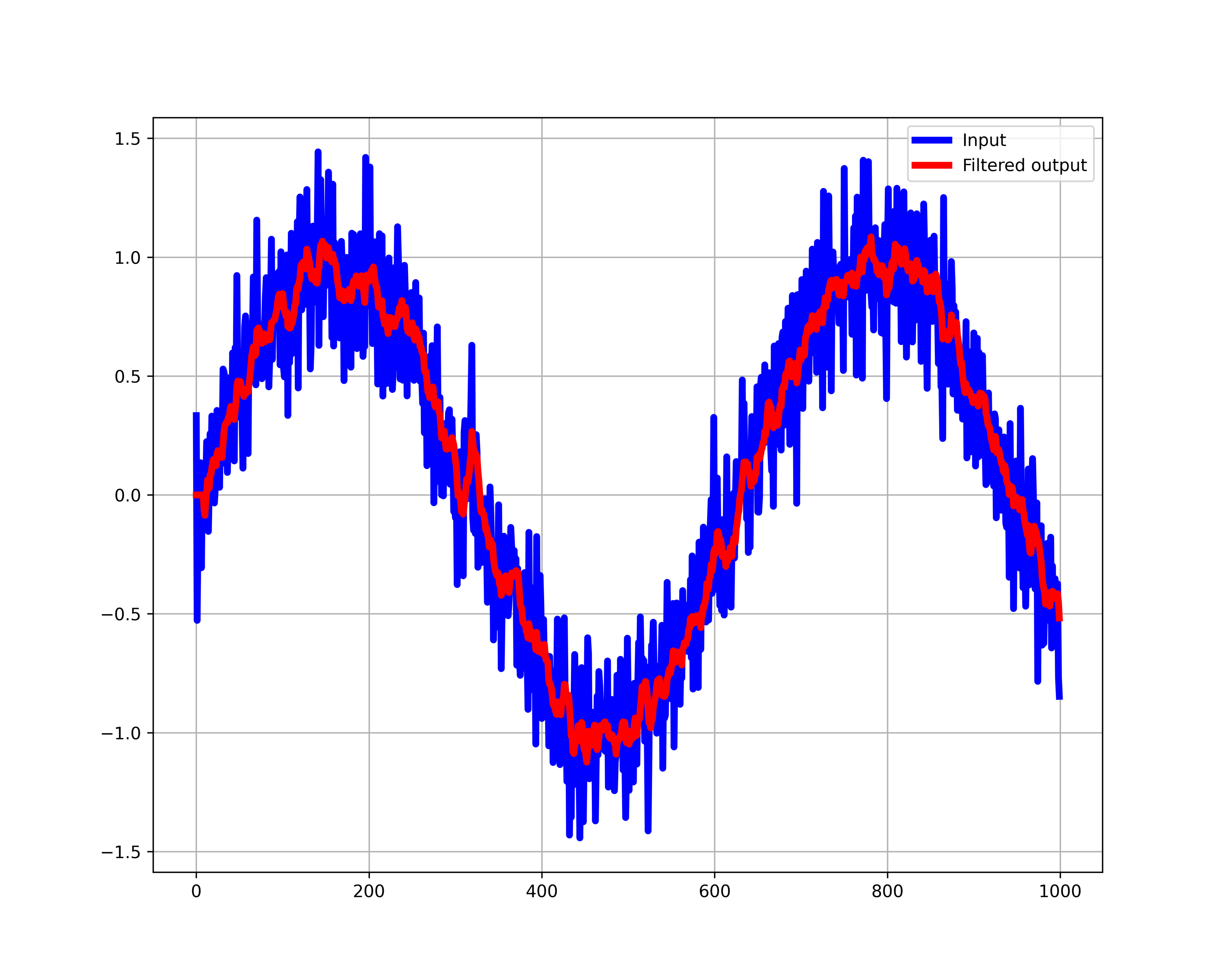
The results are shown below.